Magazine cover template for Instagram
Example: Editorial cover · Instagram post · 4:5 · 4:5
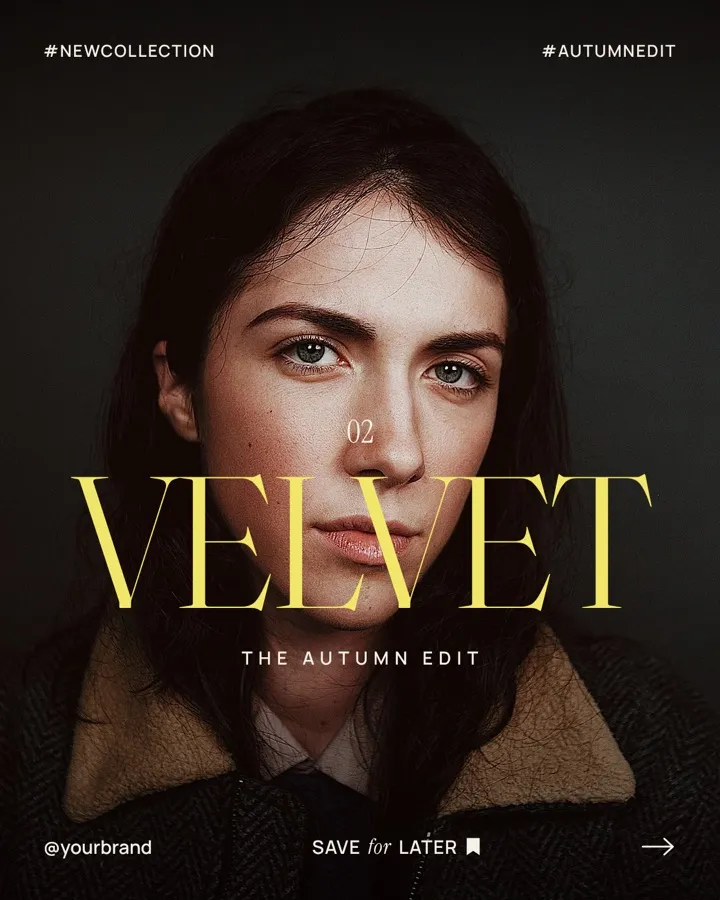
A cover-style post makes people stop because it looks like print. One full-bleed portrait, one big serif word across it, and a quiet row of hashtags and a handle at the bottom. Swap in your photo and your word, then export it at 1080×1350.
What's in it
A moody full-bleed portrait with one huge serif word across it, like a magazine cover, and a quiet “save for later” row.
- Full-bleed photo
- One big serif word
- Hashtags and handle
- 1080×1350, 4:5
How to make yours
- 01
Open the template
Choose “Use this template”. It opens in a new project with its real layout, photos and fonts. Opening it uses no credits.
- 02
Say what yours is about
Type your topic in a sentence, for example “Make it a cover for my jewelry brand's winter drop”.
- 03
Kinotion changes the content
The agent rewrites the text and swaps the photo or colors, keeping the layout. Upload your own photos and they take the place of ours.
- 04
Tweak it, then export
Ask for changes in plain words and download it as PNG, JPEG or PDF at 1080×1350.
Changes the AI makes use credits from your plan.