YouTube thumbnail template
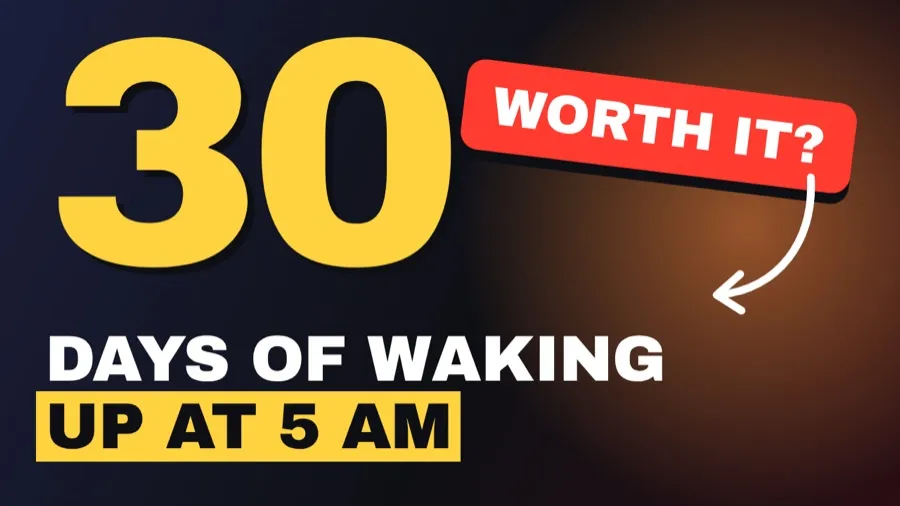
Example: Challenge thumbnail · YouTube · 16:9 · 16:9
Thumbnails get read at the size of a stamp. This one leans on a single giant number, a short promise in bold with one highlighted line, and a tilted sticker with an arrow pointing at what matters. Change the number and the title, and add your face photo if your channel uses one.
What's in it
One giant number, a short bold promise and a tilted sticker with an arrow. Built to read at search-result size.
- Giant number
- Highlighted line
- Sticker and arrow
- 1280×720, 16:9
How to make yours
- 01
Open the template
Choose “Use this template”. It opens in a new project with its real layout, photos and fonts. Opening it uses no credits.
- 02
Say what yours is about
Type your topic in a sentence, for example “I tried 7 days without my phone”.
- 03
Kinotion changes the content
The agent rewrites the text and swaps the photo or colors, keeping the layout. Upload your own photos and they take the place of ours.
- 04
Tweak it, then export
Ask for changes in plain words and download it as PNG, JPEG or PDF at 1280×720.
Changes the AI makes use credits from your plan.